

Want to create Faceless videos for your YouTube channel, social media platforms, or other marketing purposes, but don’t know which Vsub AI pricing plan to choose?
I’m here to help you make that choice.
I have been using Vsub AI to create videos for my Faceless YouTube channel, and currently, I’m on the Pro plan, which costs $49 monthly. It offers 10,000 credits monthly, $1 for a 325-credit top-up, and it allows me to export up to 10-minute videos.
There is also the Starter plan that costs $29 monthly. It offers 5000 credits per month, $1 for a 300-credit top-up, and you can export videos up to 2 minutes.
I have also researched the Premium plan, which costs $99 monthly. You enjoy 25,000 credits monthly, $1 for a 350-credit top-up, and you can export videos up to 20 minutes.
So in this Vsub AI pricing review, I shared my findings and experience to help you decide which of the plans suits you.
Vsub AI Pricing at a Glance
| Vsub AI Starter plan | Vsub AI Pro plan | Vsub AI Premium plan | |
| Number of credits monthly | 5000 | 10000 | 25000 |
| Video export duration | 2 minutes | 10 minutes | 20 minutes |
| Top up credit | $1 for 300 credit top-up | $1 for 350 credit top-up | $1 for 350 credit top |
| Team collaboration | No | No | Yes |
| Supported video platform | YouTube, TikTok, Instagram, Facebook, Pinterest | YouTube, TikTok, Instagram, Facebook, Pinterest | YouTube, TikTok, Instagram, Facebook, Pinterest |
| Free Tools | Yes, AI influencer voice generator, anime voice generator, cartoon voice generator | Yes, AI influencer voice generator, anime voice generator, cartoon voice generator | Yes, AI influencer voice generator, anime voice generator, cartoon voice generator |
| Pricing Plans | $29 monthly | $49 monthly | $99 monthly |
Start Creating Your Faceless Videos With Vsub AI
What are the differences between Vsub AI Starter plan and Vsub AI Pro plan?
Vsub AI Pro plan has a strong edge over the Starter plan.
For example, Vsub AI Pro plan offers 10,000 credits per month while the Starter plan offers 5,000 credits. These credits are what count when you create a video. The longer the video, the more credits it will consume.
Another is video export duration. On the Starter plan, you export a maximum of 2 minutes video, while the Pro plan allows you to export video of up to 10 minutes.
In terms of pricing, Vsub AI Starter is less expensive compared to Vsub AI Pro plan. While it costs $29 monthly, the Pro plan costs $49 monthly. The Pro plan even has a one-time lifetime payment that costs $490. If you are interested in the Pro plan one-time payment, you can subscribe now, as only 100 slots are available.
What’s the difference between Vsub AI Pro plan and Vsub AI Premium plan?
Vsub AI Premium is the most advanced plan. There is a big difference between it and the Vsub AI Pro plan.
First, it offers 25,000 credits to create faceless videos, while the Pro plan offers 10,000 credits.
Second, unlike the Pro plan that allows you to export a video of 10 minutes max, the Premium plan allows you to export up to 20 minutes of video, plus it has the team collaboration feature that allows you to collaborate with your team, brainstorm on faceless video ideas and for all hands to be on deck to create them.
In terms of pricing, the Premium plan is a bit pricier compared to the Pro and Starter plans.

While it costs $99 monthly, the Pro plan costs $49 monthly. In addition, Vsub AI Premium has a one-time lifetime payment that costs $990. Only 100 slots are available as of the time of writing this review.
So, hurry and secure this deal before it’s taken.
Similarities among Vsub Starter, Pro, and Premium plans
Now you know the differences between them, let’s look at their similarities
For each of the plans, you get up to 325 credit top-ups for $1 when you exhaust the normal credit your subscription plan offers you in a month.
All the plans offer customer support via live chat and email. The support is 24/7, and a customer support agent is happy to assist you anytime.
In terms of a one-time payment, the Pro and Premium plans offer it, which saves you the cost of a monthly or annual subscription.
Vsub AI Starter Plan Review
This is the least expensive plan Vsub AI offers. This is suitable for beginners who want to create short-duration faceless videos for their YouTube channel, Instagram reel, and other social media platforms. It costs $29 monthly
What it offers:
- 5000 credits per month to create any type of faceless video you want
- $1 for an additional 300 credits to continue creating videos when you exhaust your monthly credit
- Export videos of up to 2 minutes
What I like about the Vsub AI Starter plan:
It’s affordable for beginners on a tight budget
You get additional credit for just $1 when your credit for the month has finished
You export your video in HD
What I dislike about the Vsub AI Starter plan:
- You can’t export more than 2 minutes of video; this makes it useful for only short social media videos like Instagram reels, Facebook reels, TikTok, and YouTube shorts.
- If you want to create longer faceless videos for your YouTube channel, which is important to make more money via YouTube Ad revenue, the Starter plan is not ideal.
- Longer videos of up to 10 minutes are not supported on this plan, as you can’t export them.
Vsub AI Pro Plan Review
This is the second-highest plan Vsub AI offers. It allows you to export up to 10 minutes of video, making it suitable for longer faceless YouTube and social media videos.
It costs $49 monthly and even has a one-time subscription that costs $490. I upgraded to this plan from the Starter plan to export up to 10-minute videos for my faceless YouTube channel, which is necessary to boost my earnings from YouTube Ad revenue.
What it offers
- It offers 10,000 credits to create faceless videos monthly. This is 2x the credit the Starter plan offers.
- You pay $1 for an additional 325 credits, assuming you exhausted your monthly credit before your next renewal. This is 25 credits more compared to what the Starter plan offers.
- Export video of up to 10 minutes. This is far generous compared to the Starter plan that allows up to 2 minutes only.
What I like about Vsub AI Pro plan
- It offers more monthly credit compared to Starter plan
- You also get 325 credits for $1 if you finish your regular monthly credit before the next renewal
- You export video of up to 10 minutes in HD
What I dislike about Vsub AI Pro plan
- The monthly plan is expensive compared to the Starter plan. This makes it out of reach for a beginner on tight budget
Vsub AI Premium Plan Review
This is the most advanced plan Vsub AI offers. It offers more credit than the Starter and Pro plans, and has a team collaboration feature that is missing on the two other plans. It costs $99 per month and has a one-time subscription that costs $990.
What it offers
- Vsub AI premium offers 25,000 credits monthly, which is higher than the Pro plan that offers 10,000 and the Starter plan that offers 5000.
- You get an additional 325 credits for just $1 when you exhaust your monthly credit
- It allows you to export up to 20-minute videos, which is suitable for creators who want to make longer faceless YouTube and social media videos.
- What I like about it Vsub AI Premium Plan
- It offers more credit monthly than the Pro and Starter plans
- You export videos of up to 20 minutes. This is better than the 10-minute and 2-minute video export the Pro and Starter plans support, respectively
- Video quality is super HD
- Has a one-time subscription that saves the cost of a monthly subscription
What I don’t like about Vsub AI Premium Plan
- Monthly subscriptions and one-time subscriptions are expensive.
What Type of Faceless Videos Can You Generate Using Vsub AI?
There are plenty of faceless videos you can create using Vsub AI.
The most popular is faceless YouTube video,s which is a trend these days.
Below is a video of a YouTuber who got 63k subscribers in 9 days by just creating one faceless quiz YouTube video with Vsub ai.
I have also seen other people make documentary faceless YouTube videos, or even prank social media videos that went viral using Vsub AI.
What I like about using Vsub AI for faceless videos is that it has templates for different types of videos you want to make.
Free Tools Vsub AI Offers
Apart from creating faceless videos, Vsub AI offers you free tools that you can use to create other content.
Free Fake Text Message Generators
This is a go-to tool for realistic, custom-made conversation that mimics popular chat platforms like Instagram, WhatsApp, iPhone Messenger, and Tinder.

It can effortlessly create fake text messages that look real. It’s suitable for digital creators who want to make storytelling viral content, or polished mock-ups.
It’s very easy to use, completely free, and provides you with all the multimedia experience. Many creators on TikTok, YouTube, and Instagram are making more money online using this free tool to create make-believe viral content.
Free Fake iPhone Messages Generator
If you want to create iOS-style chats, the free Fake iPhone Messages Generator is what you need. What I like about it is that the interface is as real as that of an iPhone. It allows you to make adjustments, from timestamps to message colors for a realistic and believable effect, which is ideal for drama-filled social media stories.
Free Fake Tinder Messages
With this tool, you can build fake Tinder conversations for hilarious dating stories, social media skits, and pranks. If you are a digital creator in the dating niche, you can use this tool to create fake dating scenarios, add profile photos, and use the original Tinder-style messages to tell any story you imagine.
Free Fake Instagram Message Generators
If you are an influencer or digital creator on Instagram, you will need this tool to create make-believe Instagram DMs that will drive massive engagement and even make your content go viral.
Some creators I follow on IG are already using it to create Instagram Reels, which they also post on TikTok. The idea is to make a fictional character chat mimic that of a celebrity.
Free Fake WhatsApp Messages Generator
This tool is good for storytelling, pranks, and sharing relationship advice videos. It allows you to add realistic elements like custom status, message read indicators, and profile images.
Cartoon AI Voice Generator
Use this tool to generate the voice of your favorite cartoon character. It also offers text-to-speech in 29 languages. Just download clear audio from the cloud and generate content your audience will love.
I have used this free tool to generate cartoon voices, which I used in my faceless YouTube videos, and below is how it works:
Login to your Vsub account
Choose “ AI Voice Generator” tool
Select your character
Enter your text content and click “ Generate”
That’s it. Within a few minutes, Vsub AI generates a cartoon character voice for you.
Anime AI Voice Generator
If you want to generate anime voices for your video production, this tool does exactly that. It’s an AI text-to-speech model that generates high-quality AI anime voices that suit any type of video you want to create.
AI Influencer Voice Generator
Do you like an influencer and want to use their voice in your video?
You can generate it easily using this tool. Let’s assume you like YouTube Superstar, Mr. Beast, and you want to add a few minutes of his voice to your video, you can use this AI text-to-speech model to generate and download it.
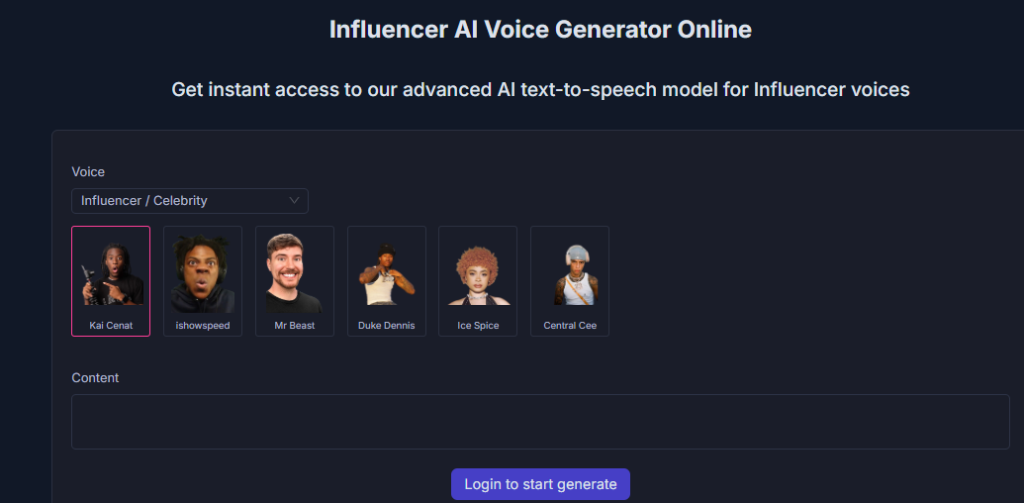
I have once used it to generate the voice of Ice Spice, a popular American rapper, which I used in one of my videos on popular American rappers.
Vsub AI alternatives
Although Vsub ai is the best AI faceless video generator in my own experience, it also has alternatives you can try if you aren’t satisfied with the features or if the pricing plans are above your budget:
Vsub AI Pricing: What Reddit Users Say
I jumped on Reddit to get an honest review of other video creators that use Vsub AI.
From over 10 comments I read, it’s obvious that many users prefer the Pro plan just because it offers more credits and allows you to export videos of up to 10-minute.
A creator who runs a monetized faceless YouTube channel says that he started using Vsub in early 2025 and has created over 100 short videos and 30 long videos.
According to him, the Pro plan is affordable and suitable based on his requirements, but plans to upgrade to the Premium plan, which allows creators to export up to 20-minute videos.
A TikTok creator who makes money selling digital products says that she is on the Premium plan that costs $99 monthly and has created over 50 faceless videos from which 15 went viral, and helped me make $4200 from the sale of her digital products.
Is Vsub AI free?
Vsub AI isn’t free. It doesn’t even offer a free trial. You need a paid subscription if you want to create faceless videos with it.
How much is Vsub AI subscription?
The Starter plan costs $29 per month, the Pro plan costs $49 per month, while the Premium plan costs $99 per month. There is a one-time subscription for the Pro and Premium plans, which costs $490 and $990, respectively.
Final Thoughts on Vsub AI Pricing Review
As a creator who uses Vsub AI, I recommend you go for the Pro plan to start. It costs $49 monthly, which can be expensive if you are on a budget, but it’s worth it.
Imagine creating a 10-minute valuable, and media-rich video in a few minutes.
A video creator you hired on Fiverr will charge nothing less than $50 to create one for you. Now you have an AI tool that costs $49 monthly doing that for you. And you can use it to generate up to 20 faceless videos monthly.
When you have the budget, upgrade to the Premium plan so you can get more credit and have access to the team collaboration feature.
And if you plan to post only short videos of less than 2 minutes on platforms like TikTok, Instagram, Facebook, and even on YouTube shorts, then go for the Starter plan that costs $29 monthly



![Viddyoze vs CreateStudio[Top 8 Features Compared+Verdict]](https://www.depreneurdigest.com/wp-content/uploads/2021/12/viddyoze-vs-createstudio_optimized-150x150.png)